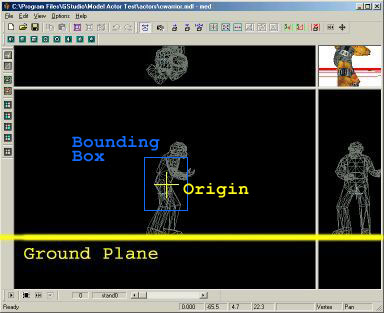
The Ground Plane
It is important that you position the frames of your animation properly in each cycle. Otherwise you will get strange effects (such as the player swimming above the surface of the water or ducking into the ground). Different animation states (such as duck and swim) follow different sets of rules as far as it's proper positioning goes. I will go through each state here using the "cwarrior.mdl" model from the Low-Res Models Pack as an example.
The first frame of the model is important because it sets up the model's bounding box values (min_x and max_x vectors). Unless you manually change the bounding box in your script, this is the box that will be used to handle all collision. You can read details about this in the collision chapter - for the moment it is sufficient that you know that this box is centered around the model's origin, and is usually smaller than the model. The origin is the small cross you see in MED and must always be located near the center of the model.
By default, any model gets a standard bounding box in the size given by the hull offsets in the Map Compiler dialog. The standard bounding box has a height of 64 units and a width of 48 units. Therefore, a normal actor model should be sufficiently larger than 64 units - otherwise the bounding box will drag on the ground and the model would be lifted in the air, and become stuck on any obstacle. If you're using models of a different scale, you can either adjust the standard bounding box by giving different hull offsets, or set an individual bounding box by adjusting the min_x and max_x vectors in the entities' action.
For collision with the ground, the template scripts do not use the model's bounding box, but just measure the distance of it's feet to the ground. Therefore the model must normally keep the same distance to the ground in all his animation cycles. This is done by imagining a 'ground plane' the model stands on. The 'ground plane' is an imaginary plane parallel to the X-Y plane set beneath the origin by the min_z value of the model - i.e. the lowest vertex of its first frame.
To determine your ground plane look at the first frame of animation (probably 'stand0') and find the lowest point in one of the bottom two view windows (side or front). If you imagine a line that runs through this point and is parallel to the bottom of the window, you have the base 'ground plane'.
The Ground Plane
It is important that you remember where this plane is for the rest of the states.
Its also important to remember that the height of your model's origin above this ground plane determines how well your model will be able to climb steps and slopes. If the origin is high above the ground plane your model will be able to climb over walls, if it is beneath the ground plane the model will not be able to move on solid ground at all.
► latest version online