 Polygon Polygon Polygon Polygon Polygon Polygon Box Polygon Polygon
 If an entity is moved not by displacing it's position, but with the c_move or c_rotate functions or by the physics engine, collisions with other entities or level geometry are automatically detected and can cause reactions. Possible reactions are automatically gliding along the obstacle, or script functions triggered by entity events like EVENT_IMPACT, EVENT_BLOCK, EVENT_ENTITY, EVENT_FRICTION, or EVENT_PUSH.
For preventing that actors get entangled with their limbs or weapons, game engines use not the real shape, but a simple collision hull - normally a sphere, a capsule, or an ellipsoid - for moving actors. Obstacles like terrain or level geometry, doors or lifts however have a polygonal hull. For a collision of a moving actor with an obstacle, the engine uses an Ellipsoid vs. Polygon collision detection. An ellipsoid is a distorted sphere that can emulate many collision shapes, such as cylinders, spheres or flat disks. For moving actors against moving actors, the engine uses an OBB vs. OBB collision detection. OBB means 'oriented bounding box' and is a rectangular box that rotates with the entity. These two collision types cover all possible collisions that can happen in a game.
The engine won't know by itself if a certain entity is a moving actor, an obstacle, or althogether irrelevant for collision. By default, the engine assumes that all objects are relevant for collision detection, and assigns a simple hull to all models and sprites, and a polygonal hull to map blocks, map entities and terrain. If anything different is required for an object in your level, you have to tell this to the engine by setting object flags in the level editor or in the entity script. The following flags are relevant:
| WED | Script | Comment |
| Detail | - | No collision detection. Use this flag for all blocks that should not act as an obstacle and not affect the BSP tree. |
| Passable | PASSABLE | No collision detection. Use this flag for all entities that should not act as an obstacle. |
| Polygon | POLYGON | Use this for models that should act as polygonal obstacle. Don't use it for moving actors! |
| BBox | c_setminmax() | For entities that should use their real size for the simple collision hull, instead of a standard size (see below). |
!! Not caring about collision detection flags will work in most cases, but not when you're using large models in your level - f.i. for rocks or buildings - that should act as polygonal obstacles. Even for smaller obstacles you might prefer to set the POLYGON flag that is a little slower, but ensures a more precise collision and smoother gliding along the surfaces.
Depending on the obstacle, the move and trace functions use different collision shapes:
|
Obstacle |
Model, Sprite | Model (POLYGON) | Terrain, Map, Level |
| c_trace | Ray Polygon |
Ray Polygon |
Ray Polygon |
| c_trace (USE_BOX) | Ellipsoid Polygon |
Ellipsoid Polygon |
Ellipsoid Polygon |
| c_move | Box Box |
Ellipsoid Polygon |
Ellipsoid Polygon |
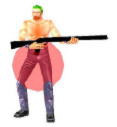
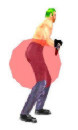
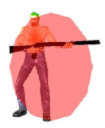
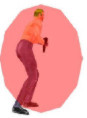
Bounding ellipsoids or boxes are oriented, i.e. they rotate with the entity. Their size and shape is essential for a proper collision detection. By default, entities get an X/Y symmetrical hull in two standard sizes, depending on their FAT and NARROW flags. The two standard hull sizes can be set up separately for any level in the Map Compiler settings. Using standard sizes and not the real actor size is important for shooters or RPGs to ensure that all actors fit through the same doors regardless of their real shape. You can this way safely avoid situations where an opening is just a little bigger than the collision hull, as such situations can lead to actors become stuck.
 |
 |
 |
 |
NARROW |
FAT |
||
If required in special cases - for instance, for a very large actor, or in a car racing game - the hull can be set to the entities' real size by checking BBox in WED, or by calling c_setminmax, or by manipulating the entities' min_x...max_z bounding box parameters directly and setting both FAT and NARROW flags simultaneously. For objects like cars, rockets or torpedoes the best suited shape is a slim elongated hull; for actors it's a hull in the shape of a symmetrical vertical column. Symmetrical is recommended because when an oriented box or ellipsoid rotates, it can otherwise collide with obstacles, even if the entity position does not change. Therefore the c_rotate function must be used for rotating an unsymmetrical entity when it can collide during rotation. If a hull has the same size in X and Y direction however, the entity can change its horizontal angle (pan) directly without caring about c_rotate. For a cubic box or a sphere shaped ellipsoid, c_rotate is not required at all.
Collision is CPU intensive and you are advised to avoid unnecessary collision detection. For example, don't do a box trace (USE_BOX) where a ray trace would suffice. Physics collision is faster on nVidia graphics cards as it can be hardware accelerated. For physics collision you have the choice between simple hulls - a capsule, box or sphere - and a convex polygon hull through pXent_settype.
Both c_move and c_rotate internally make use of c_trace by automatically setting USE_BOX and providing additional functionality such as gliding. If USE_BOX is not set, the c_trace collision will always use a ray. If the USE_BOX mode is set, c_trace tests an ellipsoid shape against polygonal targets. The collision shape used by c_move or c_rotate is either an oriented ellipsoid or an oriented box. Which one of these two is used depends on whether the collision is with a polygonal or a nonpolygonal target.
Level collisions are always performed using the ellipsoid. Entity collisions can also be performed with the ellipsoid vs. polygon routine, provided that the target entity (the one that is not moving) has the POLYGON flag set, or the USE_POLYGON mode is activated. By default, terrains have POLYGON at on and all other entities have POLYGON set to off.
The reason for using different collision hulls is speed and stability. For entities with a high polygon count using its box will be faster. Entities that move can get entangled when collision is done with the ellipsoid-polygon routine. For this reason, do not use the ellipsoid-polygon routine for collision obstacles that have 'hooks' or 'gaps' where a moving entity could get stuck.
The standard hulls are called NARROW and FAT. NARROW is a sphere with a 16 quant radius around the entity's center. FAT is an ellipsoid with a 32 quant radius along the X and Y and positive Z axis. It only extends 16 units down along the negative Z axis though. You activate a default hull size by setting the appropriate flag to on and the other one to off. All subsequent c_trace/c_move/c_rotate calls will then use the new hull size. Thus to activate the NARROW hull in an entity's action you would write (see images above):
set(my,NARROW);
reset(my,FAT);
In order to use custom hull sizes you have to set both the NARROW and FAT flag. Then you will need to adjust the bounding box by setting the min_x, min_y, min_z and max_x, max_y, max_z parameters of the entity. The easiest way to do this is to call c_setminmax (me). When pressing [F11] twice in the engine window, you'll see the bounding boxes of all entities highlighted in blue.
c_setminmax() uses only the vertex extents of an MDLs first frame. If you want to use extents from a different frame, you need to call c_updatehull (my, n) instead. This sets my.min_xyz / max_xyz according to the bounding box at frame number N. The minimum and maximum extents of an entity are calculated upon loading/ ent_creating it, thus c_setminmax can quickly copy these values to my.min_xyz/ max_xyz. While c_setminmax is essentially free (very little time required to update the hull size), c_updatehull can take some time to execute because it needs to reload the vertices of the specified frame. Thus you should not call c_updatehull every single frame but only for major animation changes such as a standing character who now kneels. For the same reason you should not call c_setminmax(my) instead of c_updatehull(my,0) - they both give the same result but c_updatehull will be much slower. If you know your entity's dimensions the fastest way to change the hull size is to set my.min_xyz/ max_xyz directly.
Though you can set the hull to arbitrary dimensions, it is recommended that it be symmetrical whenever possible. When using different radii along the x, y, and z axes c_rotate is more likely to get your player stuck while turning.
With an ellipsoid collision gliding along walls and slopes is a very simple process. In the function call just provide the relative forward motion and for gravity also add the absolute downward velocity. This will allow your character to move about the environment and along slopes efficiently. However, when using stairs or slopes the values need to be tailored to a certain character height and framerate. To prevent an entity from moving up a stair you will have to either reduce its forward momentum or increase the gravity. If on the other hand you want to make an entity climb a particularly high stair you would have to increase its forward velocity or reduce gravity. Given sufficiently large velocities an entity can climb any stair that is up to half its size (assuming that c_setminmax was used to set the ellipsoid to be as tall as the entity).
For these reasons the Gamestudio Template Scripts use two c_move calls instead. One to handle gravity, the second to handle the forces acting on the player. This is a more flexible solution that allows for more control but is slower than a single c_move call.
After initial setups, c_trace and c_move proceed with inspecting entities for potential collisions. If ACTIVATE_TRIGGER is not enabled then the engine can use its binary tree to only check nearby entities. If ACTIVATE_TRIGGER is enabled however, it is necessary to check every entity in the level because the trigger range can be arbitrarily large. Therefore you should only use ACTIVATE_TRIGGER if you have to.
Assuming IGNORE_CONTENT is set then for each of the entities in the tree leaf (or in the whole level when using ACTIVATE_TRIGGER) their type is checked to see if it matches the flags IGNORE_MODELS, IGNORE_WORLD, IGNORE_SPRITES and IGNORE_MAPS. If the entity can be ignored according to these flags, the next entity in line gets checked. Should the entity type be valid, it is then compared with you and me (assuming that IGNORE_ME or IGNORE_YOU is set). Finally the bounding spheres of me and the current entity are checked for overlapping. If all these tests indicate that the entities might collide, then further processing is required.
If IGNORE_CONTENT is not set, a precise collision is done with all nearby passable map and terrain entities, no matter whether IGNORE_MAPS, IGNORE_PASSENT or IGNORE_WORLD is set. At this point in_passable, on_passable and passable_ent are updated to point to the current entity if the trace starting point lies within the entity's axis-aligned bounding box. For terrains the bounding box is assumed to extend all the way down to the bottom of the level. If there is no passable entity at the starting point, but one can be found along the trace line, then passable_ent will be set to this one instead and on_passable gets set as well.
Once all entities have been processed in this way the level blocks get checked. To disable this check IGNORE_WORLD needs to be set.
When this is done a thorough (i.e. slow) test is performed between the requested bounding shapes (ray, polygons, OBB, or ellipsoid). All intersections are stored and sorted by distance from the trace origin. At this point contacts with pushable and passable entities are discarded. The closest hit (if any) is returned.
Movement and rotation is achieved internally by calling c_trace with USE_BOX set.
In case of a collision while the GLIDE flag is set, Gamestudio will calculate a reflection vector based on travel direction and contact normal. A second trace is then performed along this reflection vector. If this results in another collision then a new reflection vector is calculated, etc. After a maximum of 3 collisions c_move gives up.
Gliding can be restricted to the XY plane by setting disable_z_glide to 1. By default the ellipsoid can move up any slope, no matter how steep it is. To restrict this motion you can alter the global variable move_min_z. If the contact normal's Z axis is less than this minimum value no gliding along Z will take place at all. Hitting the ground plane will result in a normal.z value of 1.0 (pointing straight up). Hitting the ceiling will yield -1.0 (straight down) and a head on collision with a perpendicular wall will have a normal.z value of 0. The default value of move_min_z is -1 which allows gliding at all angles. If you were to set it to 0.5 instead all slopes steeper than 60 degrees (=acos[0.5]) would cause the entity to stop and not glide up. This example is valid only for a spherical hull. For an ellipsoid some trial and error is required to find the right value. Rather than relying on move_min_zit is recommended that you place invisible entities in front of steep walls to block them off.
c_rotate first attempts an in-place rotation by setting the desired angles. If this results in a collision then a glide vector similar to the one above is calculated and c_move is called to push the entity a certain distance away from the wall. Again a rotation is attempted. Should this one succeed then the entity is moved back towards its starting point. Otherwise another reflection is calculated and c_move gets called. In a worst case scenario c_rotate calls c_trace 5 times and c_move 4 times before giving up and returning the player to its starting position/orientation. Keeping entity hulls mostly symmetrical and avoiding V-shaped level geometry is essential to increasing the performance of c_rotate.
► latest version online