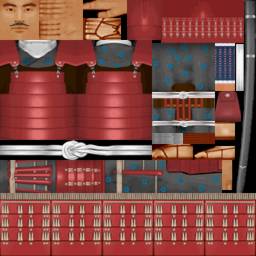
Samurai skin
Gamestudio uses several proprietary file formats that are similar to popular formats used by other engines, such as the engines by id Software. There are five Gamestudio-specific 3D file formats: WMP for a level, WAD for level textures, WMB for a compiled level with BSP tree and lightmaps, MDL for animated models, and HMP for terrain. There is also the file format WDL for project specific settings such as folders and paths, and the compressed resource file format WRS.
A WMP file is created by the level editor WED. It contains the following elements in a hierarchical tree structure that follows the group structure when designing a level:
WAD files can be created by WED or by third party editors. They contain textures in 8-bit, 16-bit, 24-bit, or compressed DDS format, plus their mipmaps.
WMB files are created by WED's Map Compiler. They contain the content of the WMP file with included textures, BSP tree data, and lightmaps.
MDL and HMP files are created by the model editor MED or by external tools. They come in two flavors. MDL5 and HMP5 is the old format used by all Gamestudio versions. MDL7 and HMP7 is the new format used by Gamestudio/A6 and A7. The old MDL5 and HMP5 formats are described below. The new MDL7 and HMP7 formats can be read and written through the MDL SDK available on the Gamestudio Download page.
The WMB format is compiled from a WMP level by WED's map compiler. It's basically a collection of lists for the level entities, blocks, textures, lightmaps, and so on. Of the 20 lists, only 5 are used for a simple level. The rest are 'legacy' lists that were only used in old format versions (WMB1..WMB6), and 'bsp' lists used only for BSP tree levels. They can be left empty. An empty list has offset and length both at 0.
typedef struct {
  long offset; // offset of the list from the start of the WMB file, in bytes
  long length; // length of the list, in bytes
} LIST;

typedef struct {
  char version[4]; // "WMB7"
  LIST palettes;// WMB1..6 only
  LIST legacy1; // WMB1..6 only
  LIST textures;// textures list
  LIST legacy2; // WMB1..6 only
  LIST pvs;     // BSP only
  LIST bsp_nodes; // BSP only
  LIST materials; // material names
  LIST legacy3; // WMB1..6 only
  LIST legacy4; // WMB1..6 only
  LIST aabb_hulls; // BSP only
  LIST bsp_leafs;  // BSP only
  LIST bsp_blocks; // BSP only
  LIST legacy5; // WMB1..6 only
  LIST legacy6; // WMB1..6 only
  LIST legacy7; // WMB1..6 only
  LIST objects; // entities, paths, sounds, etc.
  LIST lightmaps; // lightmaps for blocks
  LIST blocks;  // block meshes
  LIST legacy8; // WMB1..6 only
  LIST lightmaps_terrain; // lightmaps for terrains
} WMB_HEADER;
The textures list starts with the number of textures, followed by an array of texture offsets:
// textures
long num_textures; // number of textures
long offset[num_textures]; // list of texture offsets from the start of the list (i.e. from the long num_textures), in bytes
A texture begins at the offset given by the array of texture offsets. It consists of a TEXTURE struct, followed by the texture pixels or image content.
typedef struct {
	char name[16];   // texture name, max. 16 characters
	long width,height; // texture size
	long type;	    // texture type: 5 = 8888 RGBA; 4 = 888 RGB; 2 = 565 RGB; 6 = DDS; +8 = mipmaps
  long legacy[3]; // always 0
} TEXTURE;
In case of mipmaps (type = 13, 12, or 10) the pixels of the 3 mipmaps follow the base texture pixels. In case of a compressed DDS image, the image content follows the TEXTURE struct and the width gives the image content size in bytes.
The materials list is an array of MATERIAL_INFO structs that contain the names of materials used in the level. The number of structs can be determined by dividing the list length by the MATERIAL_INFO size (64 bytes).
typedef struct {
	char legacy[44];   // always 0
	char material[20]; // material name from the script, max. 20 characters
} MATERIAL_INFO;
The lightmaps list is just an array of quadratic lightmaps with 3 bytes per pixel (blue, green, red) and a size of 1024x1024 pixels each. Thus, the size of a lightmap is 3 MB (3x1024x1024 bytes).
The lightmaps_terrain list starts with the number of terrain lightmaps, followed by an array of terrain lightmaps. If there are no terrain lightmaps in the WMB file, the lightmaps_terrain list is empty.
// lightmaps_terrain
long num_lightmaps; // number of terrain lightmaps
A terrain lightmap consists of a LIGHTMAP_TERRAIN struct, followed by the lightmap pixels with 3 bytes per pixel (blue, green, red). Any lightmap is assigned to a terrain entity.
typedef struct {
	long object; // terrain entity index into the objects list
	long width, height; // lightmap size
} LIGHTMAP_TERRAIN;
The
size of a terrain lightmap is sizeof(LIGHTMAP_TERRAIN) + 3*width*height.
The blocks list starts with the number of blocks, followed by an array of blocks.
// blocks
long num_blocks; // number of blocks
A block consists of a BLOCK struct, followed by an array of VERTEX, TRIANGLE, and SKIN structs. Its format has some similarity to a DirectX mesh.
typedef struct {
	float fMins[3]; // bounding box
	float fMaxs[3]; // bounding box
	long lContent;  // always 0
	long lNumVerts; // number of VERTEX structs that follow
	long lNumTris;  // number of TRIANGLE structs that follow
	long lNumSkins; // number of SKIN structs that follow
} BLOCK;

typedef struct {
	float x,y,z; // position
	float tu,tv; // texture coordinates
	float su,sv; // lightmap coordinates
} VERTEX;

typedef struct {
	short v1,v2,v3; // indices into the VERTEX array
	short skin;  // index into the SKIN array
	long unused; // always 0
} TRIANGLE;

typedef struct {
	short texture;  // index into the textures list
	short lightmap; // index into the lightmaps list
	long  material; // index into the MATERIAL_INFO array
	float ambient,albedo;
	long flags;     // bit 1 = flat (no lightmap), bit 2 = sky, bit 14 = smooth
} SKIN;
Thus, the size of a block can be determined through sizeof(BLOCK) + sizeof(VERTEX)*lNumVerts + sizeof(TRIANGLE)*lNumTris + sizeof(SKIN)*lNumSkins.
The objects list starts with the number of objects, followed by an array of object offsets:
// objects
long num_objects; // number of blocks
long offset[num_objects]; // list of object offsets from the start of the list, in bytes
An object struct begins at the offset given by the array of offsets. The first DWORD of any object struct determines the type of the object, and thus the size of the struct. The following types are available: WMB_INFO, WMB_POSITION, WMB_LIGHT, WMB_SOUND, WMB_PATH, WMB_ENTITY, WMB_OLD_ENTITY. The WMB_INFO object contains general information about the WMB file and is required. All other objects are optional.
typedef struct {
	long  type;      // 5 = INFO
	float origin[3]; // not used
	float azimuth;   // sun azimuth
	float elevation; // sun elevation
	long  flags;     // always 127 (0x7F)
	float version;	 // compiler version
	byte  gamma;     // light level at black
	byte  LMapSize;	 // always 2 (block lightmap size 1024x1024)
	byte  unused[2];
	DWORD dwSunColor,dwAmbientColor; // color double word, ARGB
	DWORD dwFogColor[4];
} WMB_INFO;

typedef struct {
	long  type;      // 1 = POSITION
	float origin[3];
	float angle[3];
	long  unused[2];
	char  name[20];
} WMB_POSITION;

typedef struct {
	long  type;      // 2 = LIGHT
	float origin[3];
	float red,green,blue; // color in percent, 0..100
	float range;
	long  flags;     // 0 = static, 2 = dynamic
} WMB_LIGHT;

typedef struct {
	long  type;      // 4 = Sound
	float origin[3];
	float volume;
  float unused[2];
	long  range;
	long  flags;    // always 0
	char  filename[33];
} WMB_SOUND;

typedef struct {
	long  type;		 // 6 = PATH
	char  name[20];	 // Path name
	float fNumPoints;// number of nodes
	long  unused[3]; // always 0
	long  num_edges;
} WMB_PATH;

typedef struct {
  long  type;     // 7 = ENTITY
  float origin[3];
  float angle[3];
  float scale[3];
  char  name[33];
  char  filename[33];
  char  action[33];
  float skill[20];
  long  flags;
  float ambient;
  float albedo;
  long  path;    // attached path index, starting with 1, or 0 for no path
  long  entity2; // attached entity index, starting with 1, or 0 for no attached entity
  char  material[33];
  char  string1[33];
  char  string2[33];
  char  unused[33];
} WMB_ENTITY;

typedef struct {
  long  type;     // 3 = OLD ENTITY
  float origin[3];
  float angle[3];
  float scale[3];
  char  name[20];
  char  filename[13];
  char  action[20];
  float skill[8];
  long  flags;
  float ambient;
} WMB_OLD_ENTITY;
A path is an object with variable length. It consist of node position, node skills, and PATH_EDGE structs of the following type:
typedef struct {
  float fNode1,fNode2; // node numbers of the edge, starting with 1
  float fLength;
  float fBezier;
	float fWeight;
	float fSkill;
} PATH_EDGE;
The node coordinates, node skills, and path edges follow directly the WMB_PATH struct:float points[fNumPoints][3]; // node positions, x,y,z float skills[fNumPoints][6]; // 6 skills per node PATH_EDGE edges[num_edges]; // list of edges
Thus, the size of a path object can be determined through sizeof(WMB_PATH) + sizeof(float)*(3+6)*fNumPoints + sizeof(PATH_EDGE)*num_edges.
The above described WMB format can be read by A7 version 7.70 and above. Its many empty lists, unused variables and sometimes strange choice of variable types results from the many, many layers of compatibility that must be maintained by the engine for still being able to read the structs and lists of A6, A5, and A4 WMB levels.
Despite the engine uses model files with .MDL extension, it's internal MDL5 format differs from the Quake MDL format. The MDL5 format is used by many Gamestudio Model exporters for popular editors like 3D Studio MAX, Maya, or Milkshape. It can be imported in the Acknex engines and the MED model editor, though MED normally saves its models in the newer MDL7 format that supports materials and bones. The MDL7 format is not publicly documented, but an easy-to-use SDK is freely available for filter and converter creation.
A wireframe mesh, made of triangles, gives the general shape of a model. 3D
vertices define the position of triangles. For each triangle in the wireframe,
there will be a corresponding triangle cut from the skin picture. Or, in other
words, for each 3D vertex of a triangle that describes a XYZ position, there
will be a corresponding 2D vertex positioned that describes a UV position on
the skin picture.
It is not necessary that the triangle in 3D space and the triangle on the skin
have the same shape (in fact, it is normally not possible for all triangles),
but they should have shapes roughly similar, to limit distortion and aliasing.
Several animation frames of a model are just several sets of 3D vertex positions.
The 2D vertex positions always remain the same.
A MDL file contains
- A list of skin textures in 8-bit palettized, 16-bit 565 RGB or 16 bit 4444
ARGB format.
- A list of skin vertices, that are just the UV position of vertices on the
skin texture.
- A list of triangles, which describe the general shape of the model.
- A list of animation frames. Each frame holds a list of 3D vertices.
Once the file header is read, all the other model parts can be found just by calculating their position in the file. Here is the format of the .MDL file header:
typedef struct {
  char version[4]; // "MDL3", "MDL4", or "MDL5"
  long unused1;    // not used
  float scale[3];  // 3D position scale factors.
  float offset[3]; // 3D position offset.
  long unused2;    // not used
  float unused3[3];// not used
  long numskins;   // number of skin textures
  long skinwidth;  // width of skin texture, for MDL3 and MDL4;
  long skinheight; // height of skin texture, for MDL3 and MDL4;
  long numverts;   // number of 3d wireframe vertices
  long numtris;    // number of triangles surfaces
  long numframes;  // number of frames
  long numskinverts; // number of 2D skin vertices
  long flags;     // always 0
  long unused4;   // not used
} mdl_header;
The size of this header is 0x54 bytes (84).The model skins are flat pictures that represent the texture that should be applied on the model. There can be more than one skin. You will find the first skin just after the model header, at offset baseskin = 0x54. There are numskins skins to read. Each of these model skins is either in 8-bit palettized (type == 0), in 16-bit 565 format (type == 2) or 16-bit 4444 format (type == 3). The skin structure in the MDL3 and MDL4 format is:
typedef byte unsigned char;

typedef struct {
  long skintype; // 0 for 8 bit (bpp == 1), 2 for 565 RGB, 3 for 4444 ARGB (bpp == 2)
  byte skin[skinwidth*skinheight*bpp]; // the skin image
} mdl_skin_t;
In the MDL5 format the skin is a little different, because now mipmaps
can be stored and the model skins have not necessarily the same size. If the
skin contains mipmaps, 8 is added to the skintype. In that case
the 3 additional mipmap images follow immediately after the skin image. The
texture width and height must be divisible by 8. 8 bit skins are not possible
anymore in combination with mipmaps.
typedef struct {
  long skintype; // 2 for 565 RGB, 3 for 4444 ARGB, 10 for 565 mipmapped, 11 for 4444 mipmapped (bpp = 2),
                 // 12 for 888 RGB mipmapped (bpp = 3), 13 for 8888 ARGB mipmapped (bpp = 4)
  long width,height; // size of the texture
  byte skin[bpp*width*height]; // the texture image
  byte skin1[bpp*width/2*height/2]; // the 1st mipmap (if any)
  byte skin2[bpp*width/4*height/4]; // the 2nd mipmap (if any)
  byte skin3[bpp*width/8*height/8]; // the 3rd mipmap (if any)
} mdl5_skin_t;
8 bit skins are a table of bytes, which represent an index in the level
palette. If the model is rendered in overlay mode, index 0x00 indicates
transparency. 16 bit skins in 565 format are a table of unsigned shorts,
which represent a true colour with the upper 5 bits for the red, the middle 6
bits for the green, and the lower 5 bits for the blue component. Green has one
bit more because the human eye is more sensitive to green than to other
colours. If the model is rendered in overlay mode, colour value 0x0000
indicates transparency. 16 bit alpha channel skins in 4444 format are
represented as a table of unsigned shorts with 4 bits for each of the alpha,
red, green, and blue component. 32 bit alpha channel skins in 8888 format
are represented as a table of unsigned long integers with 4 bytes for each of
the alpha, red, green, and blue component. Note that the byte order in that
case is Intel order: blue, green, red, alpha.
Samurai skin
The list of skin vertices indicates only the position on texture picture, not the 3D position. That's because for a given vertex, the position on skin is constant, while the position in 3D space varies with the animation. The list of skin vertices is made of these structures:
typedef struct
{
  short u; // position, horizontally in range 0..skinwidth-1
  short v; // position, vertically in range 0..skinheight-1
} mdl_uvvert_t;

mdl_uvvert_t skinverts[numskinverts];
u and v are the pixel position on the skin picture. The skin vertices are stored in a list, that is stored at offset basestverts = baseskin + skinsize. skinsize is the sum of the size of all skin pictures. If they are all 8-bit skins, then skinsize = (4 + skinwidth * skinheight) * numskins. If they are 16-bit skins without mipmaps, then skinsize = (4 + skinwidth * skinheight * 2) * numskins.
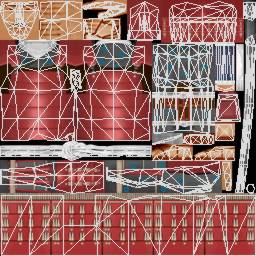
Samurai skin with uv mapping
The model wireframe mesh is made of a set of triangle facets, with vertices at the boundaries. Triangles should all be valid triangles, not degenerates (like points or lines). The triangle face must be pointing to the outside of the model. Only vertex indexes are stored in triangles. Here is the structure of triangles:
typedef struct {
  short index_xyz[3]; // Index of 3 3D vertices in range 0..numverts
  short index_uv[3]; // Index of 3 skin vertices in range 0..numskinverts
} mdl_triangle_t;


mdl_triangle_t triangles[numtris];
At offset basetri = baseverts + numskinverts * sizeof(uvvert_t) in the
.MDL file you will find the triangle list.
A model contains a set of animation frames, which can be used in relation with
the behavior of the modeled entity, so as to display it in various postures
(walking, attacking, spreading its guts all over the place, etc). Basically the
frame contains of vertex positions and normals. Because models can have ten
thousands of vertices and hundreds of animation frames, vertex posistion are
packed, and vertex normals are indicated by an index in a fixed table, to save
disk and memory space.
Each frame vertex is defined by a 3D position and a normal for each
of the 3D vertices in the model. In the MDL3 format, the vertices
are always packed as bytes; in the MDL4 format that is used by the A5 engine
they can also be packed as words (unsigned shorts). Therefore the MDL4 format
allows more precise animation of huge models, and inbetweening with less distortion.
typedef struct {
	byte rawposition[3]; // X,Y,Z coordinate, packed on 0..255
	byte lightnormalindex; // index of the vertex normal
} mdl_trivertxb_t;


typedef struct {
	unsigned short rawposition[3]; // X,Y,Z coordinate, packed on 0..65536
	byte lightnormalindex; // index of the vertex normal
	byte unused;
} mdl_trivertxs_t;
To get the real X coordinate from the packed coordinates, multiply the X
coordinate by the X scaling factor, and add the X offset. Both the scaling
factor and the offset for all vertices can be found in the mdl_header struct.
The formula for calculating the real vertex positions is:float position[i] = (scale[i] * rawposition[i] ) + offset[i];The lightnormalindex field is an index to the actual vertex normal vector. This vector is the average of the normal vectors of all the faces that contain this vertex. The normal is necessary to calculate the Gouraud shading of the faces, but actually a crude estimation of the actual vertex normal is sufficient. That's why, to save space and to reduce the number of computations needed, it has been chosen to approximate each vertex normal. The ordinary values of lightnormalindex are comprised between 0 and 161, and directly map into the index of one of the 162 precalculated normal vectors:
float lightnormals[162][3] = {
{-0.525725, 0.000000, 0.850650}, {-0.442863, 0.238856, 0.864188}, {-0.295242, 0.000000, 0.955423},
{-0.309017, 0.500000, 0.809017}, {-0.162460, 0.262866, 0.951056}, {0.000000, 0.000000, 1.000000},
{0.000000, 0.850651, 0.525731}, {-0.147621, 0.716567, 0.681718}, {0.147621, 0.716567, 0.681718},
{0.000000, 0.525731, 0.850651}, {0.309017, 0.500000, 0.809017}, {0.525731, 0.000000, 0.850651},
{0.295242, 0.000000, 0.955423}, {0.442863, 0.238856, 0.864188}, {0.162460, 0.262866, 0.951056},
{-0.681718, 0.147621, 0.716567}, {-0.809017, 0.309017, 0.500000}, {-0.587785, 0.425325, 0.688191},
{-0.850651, 0.525731, 0.000000}, {-0.864188, 0.442863, 0.238856}, {-0.716567, 0.681718, 0.147621},
{-0.688191, 0.587785, 0.425325}, {-0.500000, 0.809017, 0.309017}, {-0.238856, 0.864188, 0.442863},
{-0.425325, 0.688191, 0.587785}, {-0.716567, 0.681718, -0.147621}, {-0.500000, 0.809017, -0.309017},
{-0.525731, 0.850651, 0.000000}, {0.000000, 0.850651, -0.525731}, {-0.238856, 0.864188, -0.442863},
{0.000000, 0.955423, -0.295242}, {-0.262866, 0.951056, -0.162460}, {0.000000, 1.000000, 0.000000},
{0.000000, 0.955423, 0.295242}, {-0.262866, 0.951056, 0.162460}, {0.238856, 0.864188, 0.442863},
{0.262866, 0.951056, 0.162460}, {0.500000, 0.809017, 0.309017}, {0.238856, 0.864188, -0.442863},
{0.262866, 0.951056, -0.162460}, {0.500000, 0.809017, -0.309017}, {0.850651, 0.525731, 0.000000},
{0.716567, 0.681718, 0.147621}, {0.716567, 0.681718, -0.147621}, {0.525731, 0.850651, 0.000000},
{0.425325, 0.688191, 0.587785}, {0.864188, 0.442863, 0.238856}, {0.688191, 0.587785, 0.425325},
{0.809017, 0.309017, 0.500000}, {0.681718, 0.147621, 0.716567}, {0.587785, 0.425325, 0.688191},
{0.955423, 0.295242, 0.000000}, {1.000000, 0.000000, 0.000000}, {0.951056, 0.162460, 0.262866},
{0.850651, -0.525731, 0.000000}, {0.955423, -0.295242, 0.000000}, {0.864188, -0.442863, 0.238856},
{0.951056, -0.162460, 0.262866}, {0.809017, -0.309017, 0.500000}, {0.681718, -0.147621, 0.716567},
{0.850651, 0.000000, 0.525731}, {0.864188, 0.442863, -0.238856}, {0.809017, 0.309017, -0.500000},
{0.951056, 0.162460, -0.262866}, {0.525731, 0.000000, -0.850651}, {0.681718, 0.147621, -0.716567},
{0.681718, -0.147621, -0.716567}, {0.850651, 0.000000, -0.525731}, {0.809017, -0.309017, -0.500000},
{0.864188, -0.442863, -0.238856}, {0.951056, -0.162460, -0.262866}, {0.147621, 0.716567, -0.681718},
{0.309017, 0.500000, -0.809017}, {0.425325, 0.688191, -0.587785}, {0.442863, 0.238856, -0.864188},
{0.587785, 0.425325, -0.688191}, {0.688197, 0.587780, -0.425327}, {-0.147621, 0.716567, -0.681718},
{-0.309017, 0.500000, -0.809017}, {0.000000, 0.525731, -0.850651}, {-0.525731, 0.000000, -0.850651},
{-0.442863, 0.238856, -0.864188}, {-0.295242, 0.000000, -0.955423}, {-0.162460, 0.262866, -0.951056},
{0.000000, 0.000000, -1.000000}, {0.295242, 0.000000, -0.955423}, {0.162460, 0.262866, -0.951056},
{-0.442863,-0.238856, -0.864188}, {-0.309017,-0.500000, -0.809017}, {-0.162460, -0.262866, -0.951056},
{0.000000, -0.850651, -0.525731}, {-0.147621, -0.716567, -0.681718}, {0.147621, -0.716567, -0.681718},
{0.000000, -0.525731, -0.850651}, {0.309017, -0.500000, -0.809017}, {0.442863, -0.238856, -0.864188},
{0.162460, -0.262866, -0.951056}, {0.238856, -0.864188, -0.442863}, {0.500000, -0.809017, -0.309017},
{0.425325, -0.688191, -0.587785}, {0.716567, -0.681718, -0.147621}, {0.688191, -0.587785, -0.425325},
{0.587785, -0.425325, -0.688191}, {0.000000, -0.955423, -0.295242}, {0.000000, -1.000000, 0.000000},
{0.262866, -0.951056, -0.162460}, {0.000000, -0.850651, 0.525731}, {0.000000, -0.955423, 0.295242},
{0.238856, -0.864188, 0.442863}, {0.262866, -0.951056, 0.162460}, {0.500000, -0.809017, 0.309017},
{0.716567, -0.681718, 0.147621}, {0.525731, -0.850651, 0.000000}, {-0.238856, -0.864188, -0.442863},
{-0.500000, -0.809017, -0.309017}, {-0.262866, -0.951056, -0.162460}, {-0.850651, -0.525731, 0.000000},
{-0.716567, -0.681718, -0.147621}, {-0.716567, -0.681718, 0.147621}, {-0.525731, -0.850651, 0.000000},
{-0.500000, -0.809017, 0.309017}, {-0.238856, -0.864188, 0.442863}, {-0.262866, -0.951056, 0.162460},
{-0.864188, -0.442863, 0.238856}, {-0.809017, -0.309017, 0.500000}, {-0.688191, -0.587785, 0.425325},
{-0.681718, -0.147621, 0.716567}, {-0.442863, -0.238856, 0.864188}, {-0.587785, -0.425325, 0.688191},
{-0.309017, -0.500000, 0.809017}, {-0.147621, -0.716567, 0.681718}, {-0.425325, -0.688191, 0.587785},
{-0.162460, -0.262866, 0.951056}, {0.442863, -0.238856, 0.864188}, {0.162460, -0.262866, 0.951056},
{0.309017, -0.500000, 0.809017}, {0.147621, -0.716567, 0.681718}, {0.000000, -0.525731, 0.850651},
{0.425325, -0.688191, 0.587785}, {0.587785, -0.425325, 0.688191}, {0.688191, -0.587785, 0.425325},
{-0.955423, 0.295242, 0.000000}, {-0.951056, 0.162460, 0.262866}, {-1.000000, 0.000000, 0.000000},
{-0.850651, 0.000000, 0.525731}, {-0.955423, -0.295242, 0.000000}, {-0.951056, -0.162460, 0.262866},
{-0.864188, 0.442863, -0.238856}, {-0.951056, 0.162460, -0.262866}, {-0.809017, 0.309017, -0.500000},
{-0.864188,-0.442863, -0.238856}, {-0.951056,-0.162460, -0.262866}, {-0.809017, -0.309017, -0.500000},
{-0.681718, 0.147621, -0.716567}, {-0.681718, -0.147621, -0.716567}, {-0.850651, 0.000000, -0.525731},
{-0.688191, 0.587785, -0.425325}, {-0.587785, 0.425325, -0.688191}, {-0.425325, 0.688191, -0.587785},
{-0.425325,-0.688191, -0.587785}, {-0.587785,-0.425325, -0.688191}, {-0.688197,-0.587780, -0.425327}
};
A whole frame has the following structure:typedef struct {
long type; // 0 for byte-packed positions, and 2 for word-packed positions
mdl_trivertx_t bboxmin,bboxmax; // bounding box of the frame
char name[16]; // name of frame, used for animation
mdl_trivertx_t vertex[numverts]; // array of vertices, either byte or short packed
} mdl_frame_t;
The size of each frame is sizeframe = 20 + (numverts+2) * sizeof(mdl_trivertx_t), while mdl_trivertx_t is either mdl_trivertxb_t or mdl_trivertxs_t, depending on whether the type is 0 or 2. In the MDL3 format the type is always 0. The beginning of the frames can be found in the .MDL file at offset baseframes = basetri + numtris * sizeof(mdl_triangle_t).
A terrain is basically a rectangular mesh of height values with one or several surface textures. It is a variant of the Gamestudio MDL5 Model format, without all the data structures that are unnecessary for terrain.
Once the file header is read, all the other terrain parts can be found just by calculating their position in the file. Here is the format of the .HMP file header:
typedef struct {
	char version[4]; // "HMP5"
	long nu1; // always 2
	float scale[3]; // heightpoint scale factors
	float offset[3]; // heightpoint offset
	long nu6; // not used
	float ftrisize_x; // triangle X size
	float ftrisize_y; // triangle Y size
	float fnumverts_x; // number of mesh coordinates in X direction
	long numskins ; // number of skin textures
	long nu8,nu9; // not used
	long numverts; // total number of mesh coordinates
	long nu10; // not used
	long numframes; // number of frames
	long nu11; // not used
	long flags; // always 0
	long nu12; // not used
} hmp_header;
The size of this header is 0x54 bytes (84).int numverts_x = (int) fnumverts_x; int numverts_y = numverts/numverts_x;
After the file header follow the textures and then the array of height values.
The terrain surface textures are flat pictures. There can be more than one texture. By default, the first texture is the terrain skin, and the second texture is the detail map if it has a different size. Further textures (up to 8) are used for material effects and shaders. You will find the first texture just after the model header, at offset baseskin = 0x54. There are numskins textures to read. The texture and pixel formats are the same as for MDL skins, and are described in detail in the MDL5 format description.
A terrain contains a set of animation frames, which each is a set of height values. Normally only the first frame is used, because terrain does not animate. Each mesh vertex is defined by a height value and a normal.
typedef byte unsigned char;
typedef word unsigned short;
typedef struct {
	word z; // height value, packed on 0..65536
	byte lightnormalindex; // index of the vertex normal
	byte unused; // not used
} hmp_trivertx_t;
To get the real Z coordinate from the packed coordinates, multiply it by the Z
scaling factor, and add the Z offset. Both the scaling factor and the offset
can be found in the mdl_header struct. Thus the formula for calculating the
real height positions is:float height = (scale[2] * z) + offset[2];
The x/y scale and offset vectors determine the terrains x and y boundaries, like this:
float xmin = offset[0];
float xmax = scale[0] * 65536 + offset[0];
float ymin = offset[1];
float ymax = scale[1] * 65536 + offset[1];
The X and Y position of the vertex results of the number of the vertex in the mesh, and thus must not be stored. The lightnormalindex field is an index to the actual vertex normal vector, just like in the MDL format description. A whole frame has the following structure:
typedef struct {
	long type; // always 2
	mdl_trivertxs_t bboxmin,bboxmax; // bounding box of the frame - see mdl description
	char name[16]; // name of the frame, used for animation
	hmp_trivertx_t height[numverts]; // array of height values
} hmp_frame_t;
A not animated terrain has only one frame, but can have several skin textures,
like a MDL. By default, the first skin is used for the terrain texture and the
second skin for the detail map. Depending on the terrain material or shader assigned
in the Gamestudio script, the final terrain texture can be composed from up to
8 skin textures.